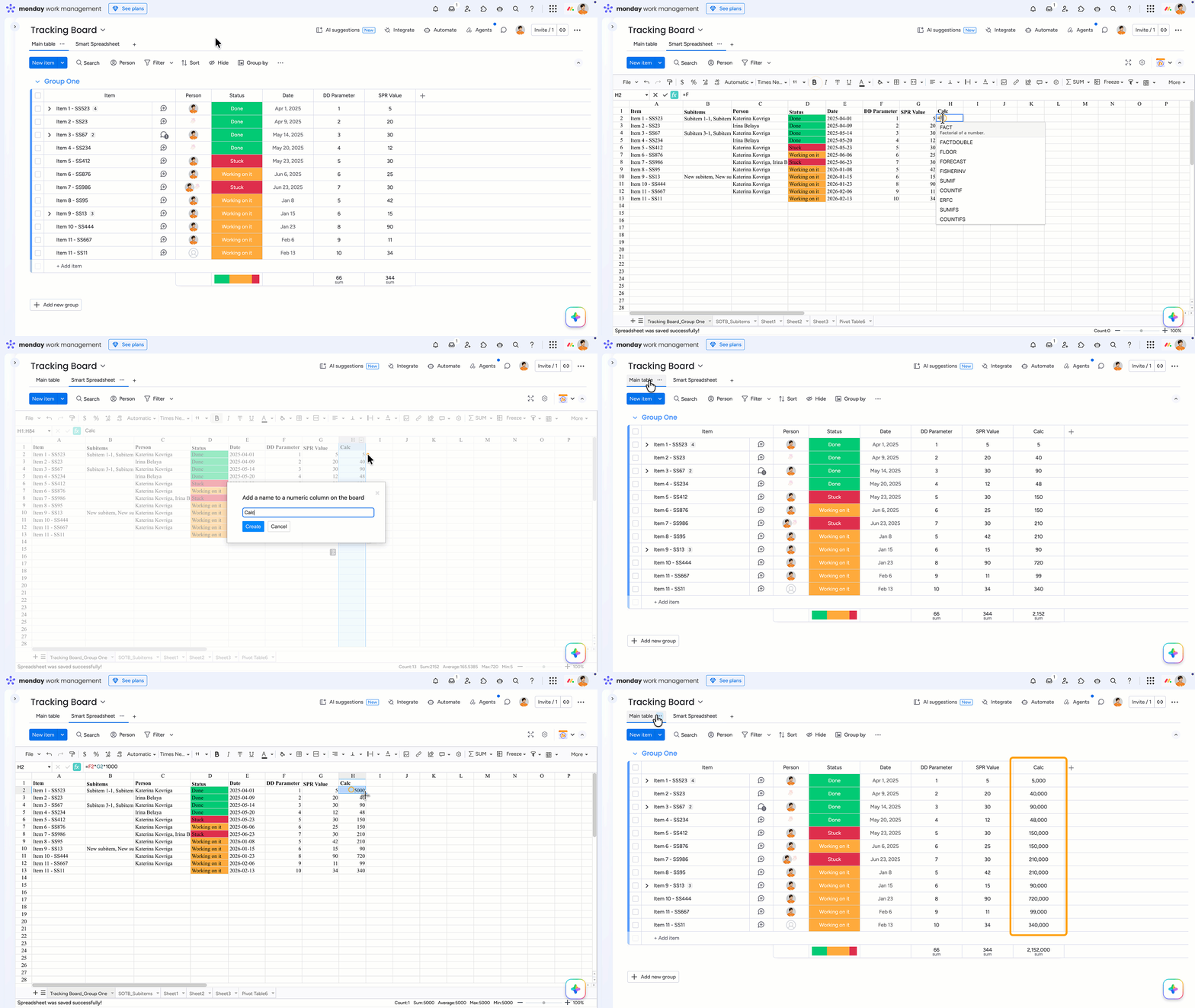
Need to perform calculations in Smart Spreadsheet using imported board data and sync the results back to monday.com? The Add synced numeric column to board feature is built for that.
It lets you create a new Number column directly on the board and automatically sync values between the Smart Spreadsheet and the board in both directions.
To add a synced numeric column to the board:
Right-click the letter of the new spreadsheet column (for example, C, D, E, etc.)
Select Add synced numeric column to board from the dropdown menu
Enter a name for the new board column
Once created, the new Number column will appear on the board and stay synced with the spreadsheet automatically.
Notice that changing the result on a board in a newly created column substitutes the formula result with the entered number. The feature is only available for numeric data in Smart Spreadsheet. Please, let us know if you need to add other types of data.
Cookie Notice
This website uses cookies for analytics, personalization and advertising. By continuing to browse, you agree to our use of cookies. Learn more