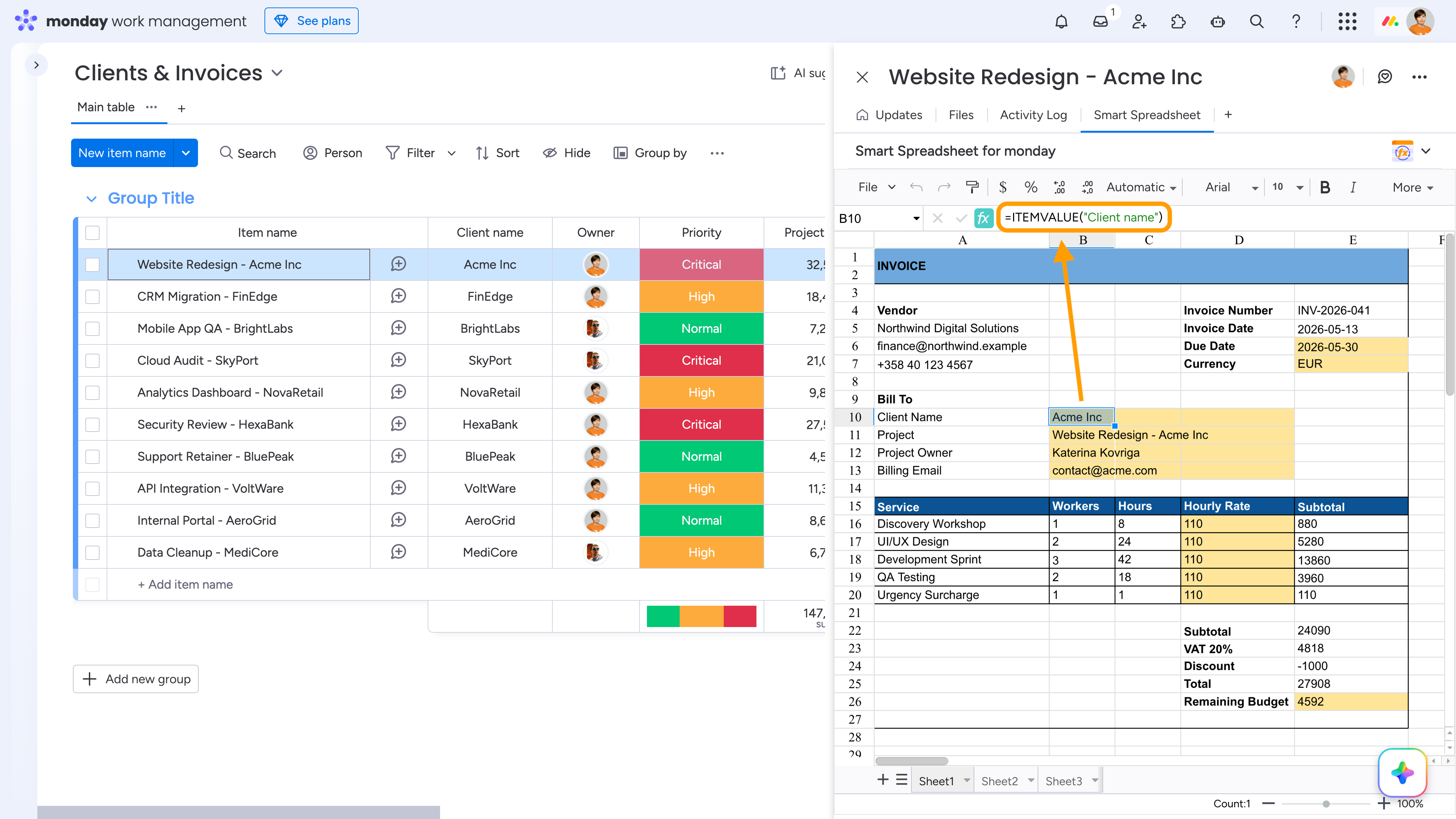
The ITEMVALUE() formula returns the value from a specific field of an item or subitem from any board.
ITEMVALUE(column_name, [item], [board_id])
- column_name - Column title or column ID to retrieve the value from the target item.
- item (optional) - Item name or item ID. In Item View, the current item is used when omitted.
- board_id (optional) - Board ID. When provided, it overrides the current board context.
Examples:
=ITEMVALUE("Status", "Task name")
=ITEMVALUE("Amount", 1234567890, 987654321)
When the ITEMVALUE() formula is used inside a Smart Spreadsheet Custom Object, live item data is also available. Even though a Custom Object is a stand-alone entity, you can specify the board_id and dynamically pull live data from monday.com items into the spreadsheet.
The ITEMVALUE() formula is especially useful in board, dashboard, item, and docs views when you need to reference only specific live values instead of importing the entire board into a spreadsheet.
Typical use cases include:
- Generating invoices
- Purchase orders
- Quotes and estimates
- Contracts and agreements
- Financial reports
- Client-facing documents
- Service reports
- Employee forms
- Approval forms
The most powerful use case for ITEMVALUE() is building reusable spreadsheet templates in Smart Spreadsheet Item View. For example, you can create invoice, purchase order, or quote templates that automatically populate with live monday.com item data:
- Open the Smart Spreadsheet Item View.
- Create and format your document template:
Export the spreadsheet as a .tfss template to preserve the layout, formulas, and formatting.
Open another item, go to its Smart Spreadsheet View, and import the same .tfss template.
The ITEMVALUE() formulas automatically pull data from the current item and recalculate the spreadsheet instantly.
This approach allows you to generate structured documents in seconds while keeping all data connected to monday.com.
For example, in the invoice below, the cells highlighted in yellow are automatically populated with data from the parent item.