Download PDF
Download page Reuse tables across pages.
Reuse tables across pages
How does it work?
This functionality lets you reuse Confluence tables across pages without duplicating them for use cases described below. It is handled by two Table Filter, Charts & Spreadsheets app macros: Table Excerpt and Table Excerpt Include.
Table Excerpt turns a regular table into a reusable data source. It supports both native and macro-generated tables (for example, Jira Issues).
Table Excerpt Include finds the relevant Table Excerpts, collects tables from one or multiple pages, and displays them together in a single place.
Typical workflow:
You create a table and wrap it with Table Excerpt.
You assign it a name (for example,
kpi-table).On another page, you insert Table Excerpt Include.
You specify the same name (
kpi-table) and define the source pages.
Result:
The tables are automatically pulled in and stay up to date whenever the original tables are changed.
👉 SEE THE COMPLETE SETUP GUIDE
What can I use this for?
Case 1: Collect table data across pages into a single dataset
📊 KPIs, metrics, and reports
Result: | 📈Project data and status tracking
You can choose how to display the collected data: as a single consolidated report or as separate tables, transposed or in the original layout. Best suited for: Program and portfolio management (PMO) |
🧩Release notes /changelogs
| 📚Catalogs and registers Each item lives on its own page, while Table Excerpt Include displays them as a single consolidated catalog.
|
Can I further process a table collected via Table Excerpt Include—for example, filter data, build pivot tables, or create charts?
Yes.
To do this, use the Table Toolbox macro. This macro allows you to combine (nest) multiple macros included in the app and perform analytical tasks with ease. For example, you can use the Table Filter macro to filter your report or set default sorting, and then create a pivot table using the Pivot Table macro.
Example:
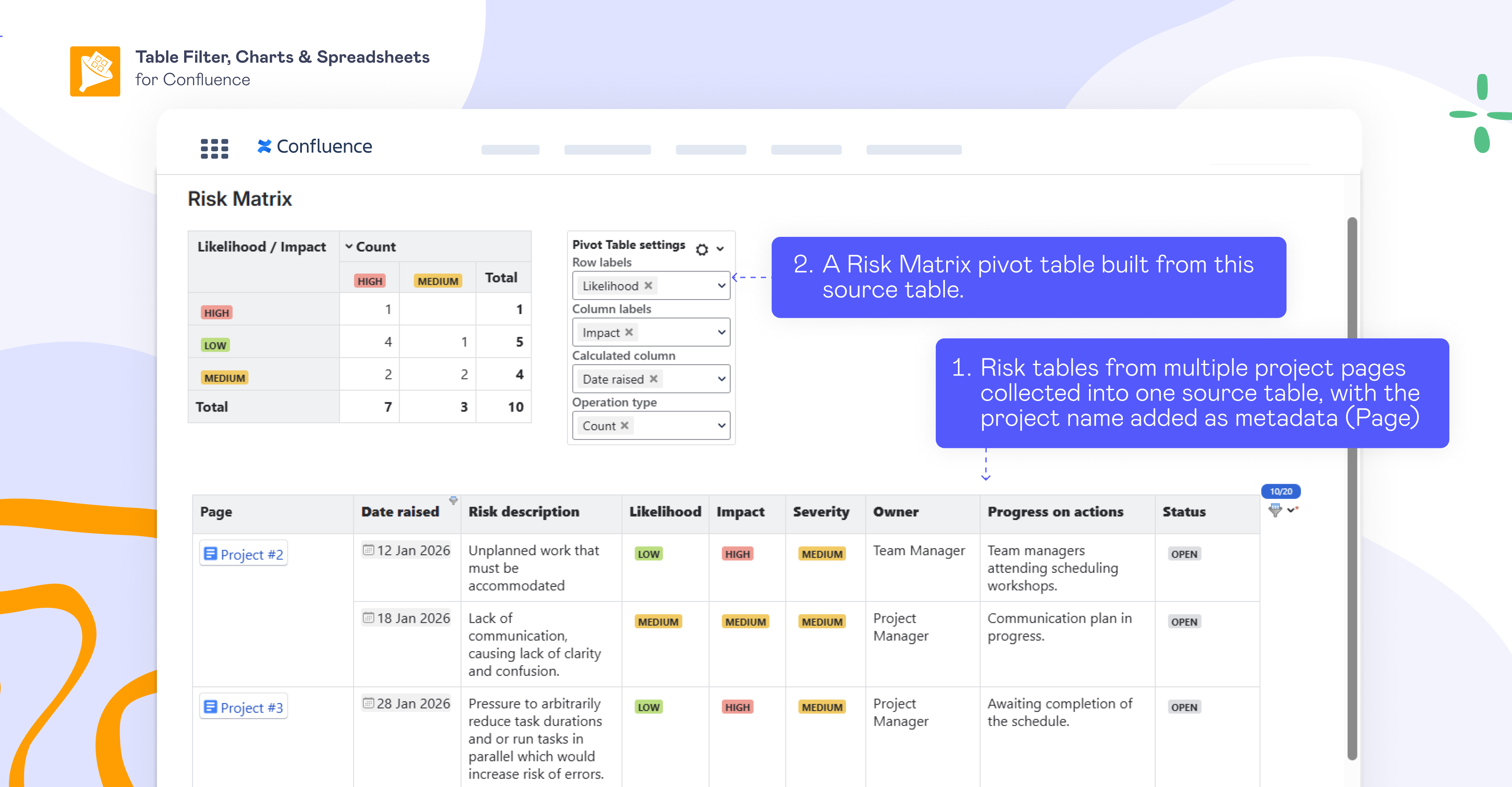
Multiple risk tables from different project pages were collected into one table with Table Excerpt and Table Excerpt Include.
Project names were added as metadata (visible in the “Page” column).
A Risk Matrix pivot table was built from the collected data.
Do Confluence page permissions affect what data my colleagues and I can see in a table collected via Table Excerpt Include?
Yes, if data is collected from multiple pages with different permission settings, each user will only see the data from the pages they have permission to view. If a user doesn’t have permission to view certain pages, then any tables or content from those pages won’t appear in the aggregated Table Excerpt Include result.
Case 2: Reuse the same table for Confluence dashboards and reports
You can reference a single table multiple times within the same page or across your Confluence instance to build dashboards and reports. This approach improves Confluence page performance by reusing smaller table fragments instead of copying large tables.
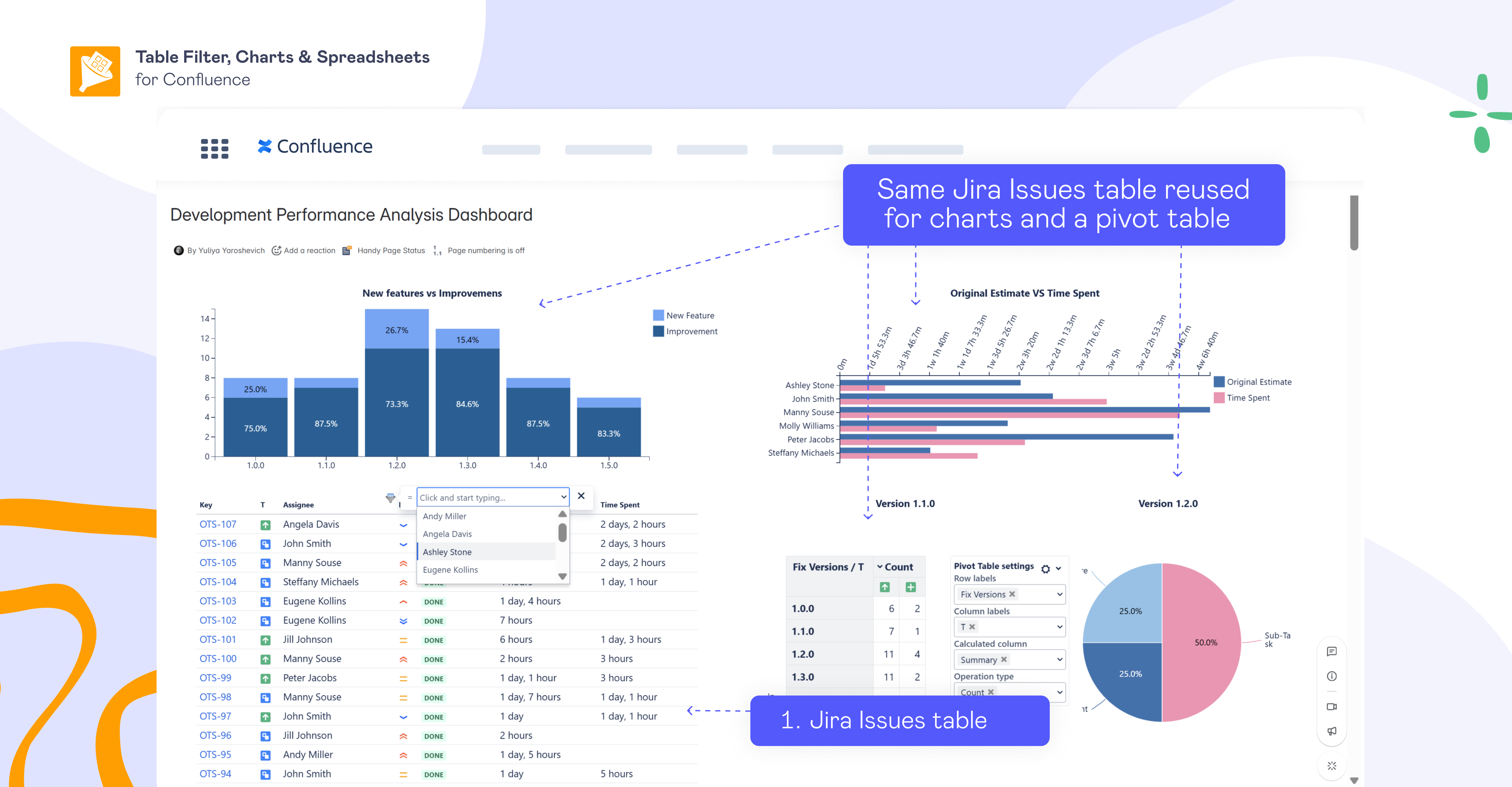
Example:
A dashboard with multiple charts and a pivot table based on a single Jira Issues table.
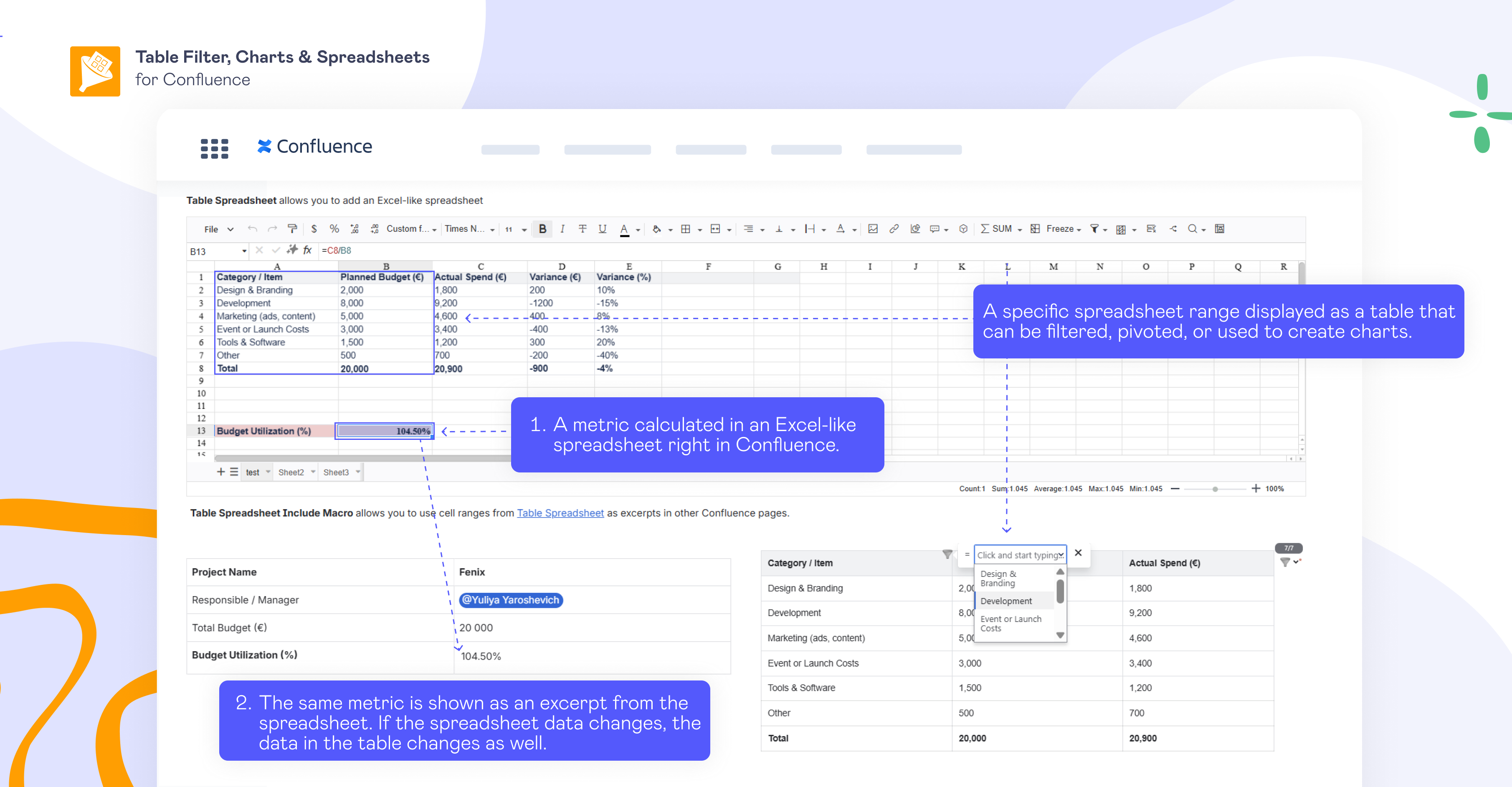
You can also reuse spreadsheet ranges as excerpts on other Confluence pages for reports and dashboards. Below is an example of:
reusing a metric calculated in an Excel-like spreadsheet as an excerpt in a table on the page
a specific spreadsheet range displayed as a table on the page that can be filtered, pivoted, or used to create charts.
This is handled by another macro included in the app — Table Spreadsheet Include.
Case 3: Build focused table views from one master table
This approach is the opposite of aggregating tables from multiple pages into a single report. Here, a large, centralized report(table) is reused to create smaller, contextualized views — while preserving a single source of truth and ensuring that all local views stay automatically in sync with the master data.
Example:
The HR team maintains a large Confluence table that lists all employees in the company, including their roles, teams, and other attributes.
Individual teams, however, don’t need the entire dataset. They only want to see an up-to-date view of their own team. Instead of copying or recreating the data, they reuse the master table with Table Excerpt and Table Excerpt Include on their team page.
The team page table is then wrapped in the Table Filter macro or the Table Transformer macro to display only the relevant rows and columns. The filtering logic can be predefined and hidden, allowing the page to show a clean, focused view tailored to the team’s needs.
Case 4: As an advanced alternative to Page Properties Report or Excerpt
If you already collect and reuse information using Page Properties Report or Excerpt, you can continue using them and extend your setup with Table Excerpt Include.
In short, this allows you to:
support macro-generated tables (for example, Jira Issue or other macros),
add extra metadata fields (for example, page creation date or labels)
use advanced options for transposing source tables,
collect tables with multiple rows,
work without limitations on the number of collected items.
See a full comparison of Table Excerpt Include with native Page Properties Report, and Excerpt Include macros.
I already use Page Properties or Excerpt on many pages. Do I need to replace them manually with Table Excerpt?
Absolutely not. When configuring Table Excerpt Include, you can choose which macro type it should collect data from:
Table Excerpt (our app macro)
Excerpt (native Confluence macro)
Page Properties (native Confluence macro)
This means you can keep using your existing Page Properties and Excerpts, and gradually introduce Table Excerpt only where it makes sense for your use case. No manual replacement required.
Example: A table that collects all existing Page Properties where needed, adds additional metadata (page creation date), and transposes the data as needed—capabilities not available in the native Page Properties Report.
👉 SEE THE COMPLETE SETUP GUIDE