A Definition of Ready checklist in Jira shows what a story needs before the team can take it into a sprint. With Checklists for Jira (Templates & Automation), the DoR checklist can appear on every new story via Jira automation, so whoever writes the story sees what's missing right away. And before planning, just one filter will show which stories aren't ready yet.
Why teams need a Definition of Ready checklist
Stories often reach the backlog with a title and little else, especially from other teams. The questions come up later:
- During sprint planning, time is spent figuring out what a story is about instead of planning.
- In the middle of a sprint, a developer waits for answers or a design.
- Estimates are off because nobody saw the full scope.
A Definition of Ready (DoR) ensures that the information is in place before work starts.
What you get
With Checklists for Jira (Templates & Automation):
- Every new story comes with a list of requirements before planning.
- The person who writes the story sees what's missing without asking the team.
- Before planning, one filter shows the stories that aren't ready.
- If you need a hard rule, a story can't be marked as ready while mandatory items are open.
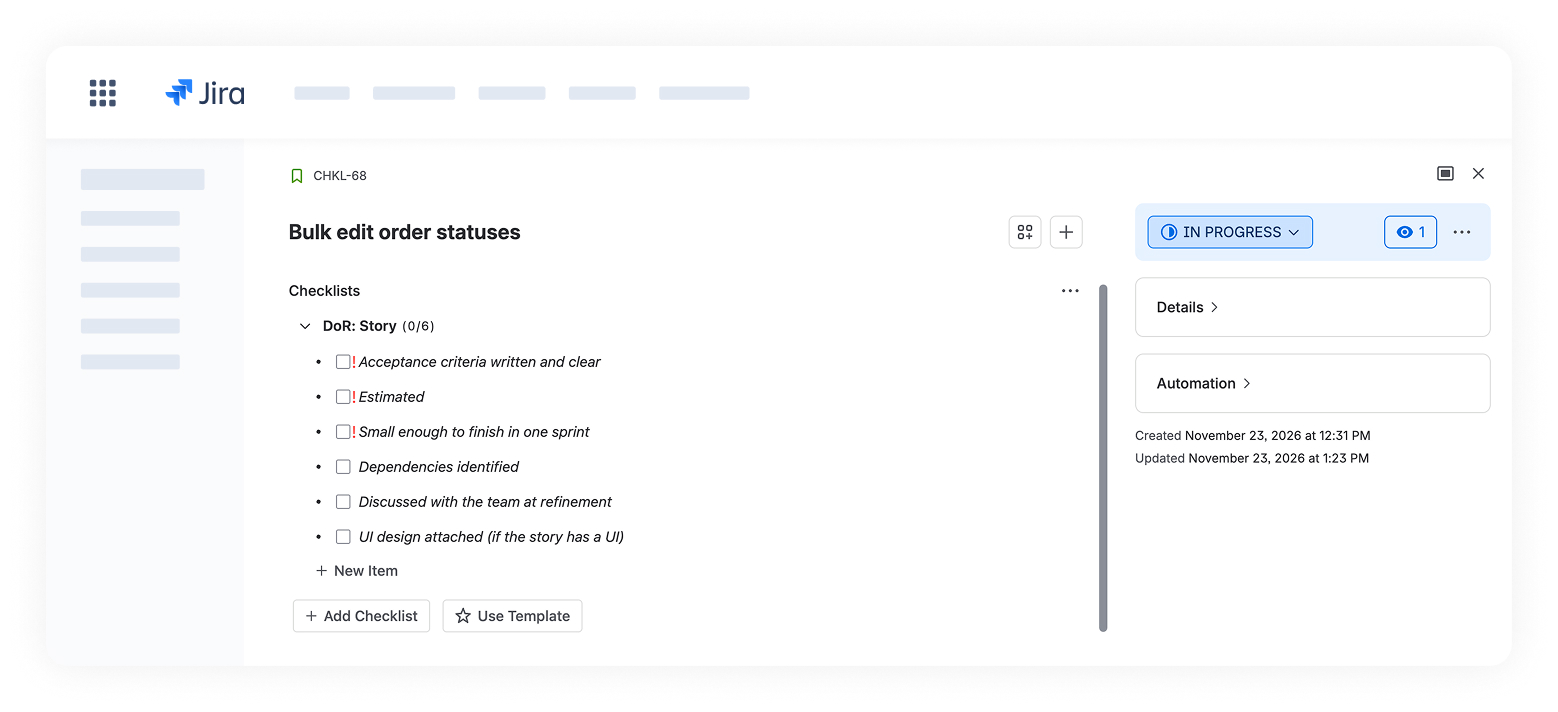
Definition of Ready checklist template
Copy this template and adjust it to your team. Mandatory items are the ones without which the team can't start.
DoR: Story
- Acceptance criteria written and clear — mandatory
- Estimated — mandatory
- Small enough to finish in one sprint — mandatory
- Dependencies identified
- Discussed with the team at refinement
- UI design attached (if the story has a UI)
Optional items don't apply to every story, so they don't block anything and serve as reminders. For bugs, a DoR: Bug template can include other details: steps to reproduce, environment and version, expected and actual results, logs, or a screenshot.
How to set it up
- Create the checklist. Add a checklist to any story, title it "DoR: Story", and add the items from the template. → Add checklists to a Jira work item
- Mark the must-have items as mandatory. Open the item's ⋯ menu and select Mark as mandatory. → Mark items as mandatory
- Save it as a template. Select ⋯ → Save as Template. Make one template for each work type, such as "DoR: Story" and "DoR: Bug". → Create checklist templates
- Add the DoR to new stories automatically. Create a Jira Automation rule in your project: Work item created → condition: Work type equals Story → Add Checklist to work item with "DoR: Story". Stories that other teams create in your project get it too. → Automation quick start
- Check readiness before planning. Save this JQL query as a filter and open it before sprint planning:
sprint is EMPTY AND statusCategory != Done AND checklistsOpenItemsCount > 0. → JQL search - (Optional) Don't let unready stories through. Add the validator Checklists: Validate that all mandatory items are complete to the transition into Ready for development, or into In Progress if your workflow has no "ready" status. → Validator setup
Tips
- Let the author fill in the DoR. The person who writes the story knows the answers. The team only looks at the checklist during refinement.
- Check that the information is there. "Acceptance criteria written" is a DoR item. The criteria themselves belong in the story description.
- Add the Definition of Done later. If you also use a Definition of Done checklist, add it when work starts, for example, on the transition into In Progress. Then a story in the backlog has only one list, and it answers one question: is the story ready?